
Track your investments
Understand portfolio indicators, inspect lots, filter positions and refresh prices.
Choose portfolio and market
Open Portfolio, then select Real portfolio or Simulated portfolio. The Console/PC preference in Settings determines which positions appear. Markets and portfolio types remain separate.
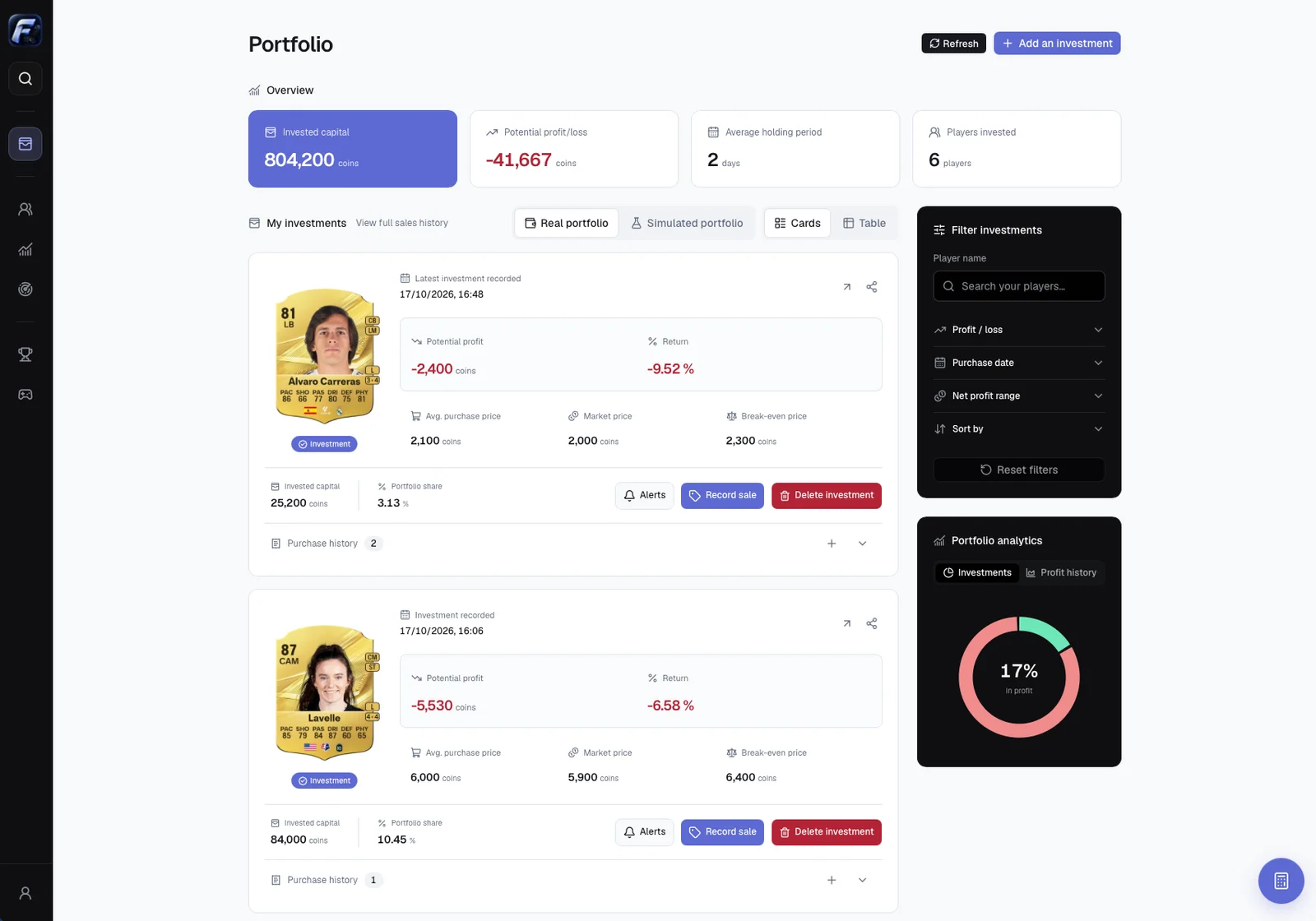
Read Overview
| Indicator | Meaning |
|---|---|
| Invested capital | Purchase cost of the cards still held in this market and portfolio |
| Potential profit/loss | Estimated resale value after tax minus remaining cost |
| Partial potential profit/loss | Result for positions with usable prices only |
| Average holding period | Capital-weighted age of remaining purchases |
| Players invested | Distinct players represented, based on available identifiers |
Open-position gains are potential. They become realized only after recording a sale.
Understand a position
A position groups lots of the same exact card version, market and portfolio. It shows remaining quantity, invested capital, portfolio share, weighted purchase price, observed price, break-even price, potential profit and return.
An additional lot changes cost and weighted average. A partial sale removes the consumed quantities and recalculates the remaining position.
Inspect purchase lots
Expand Purchase history for lot dates, quantities, unit prices and costs. Add purchase adds another lot. Delete a lot only to correct an entry. Delete investment removes all remaining lots after confirmation; it creates no sale or realized profit.
Cards and Table
Cards shows detailed positions. Table provides sortable columns and pagination. Both use the same filters and actions. Click sortable column headers to change order and use the page controls for further rows.
Filter and sort
Filter investments searches names, selects profits, losses or break-even positions, sets a purchase-date interval and limits net profit. Sort by newest/oldest purchase, highest capital or highest/lowest profit. Reset filters clears the selection. Also check market and real/simulated mode if a card appears missing.
Portfolio analytics
Investments shows the proportion of open positions in profit, loss or break-even. Positions without usable prices are excluded and identified. Profit history shows results of recorded sales for the chosen portfolio, not open-position potential profit or a player’s market chart.
Refresh prices
Refresh reads the latest available observations. Data also refreshes while visible and on return to the foreground. Wait for completion before retrying. Global estimates may be used when detailed prices are unavailable. Missing usable prices leave lots saved but valuations unknown and totals partial; they are not treated as total losses.
Position actions
Use Alerts, Record sale or Sharing. View full sales history includes sales older than the recent-sales section.