Licence and Discord
Get your free key with /request-key, activate FutCall and link private alerts.
What the key does
The free licence activates your account and links it to the Discord account that requested the key, which receives your private alerts. The key is personal and intended to activate one account. No payment card is required.
Request a key
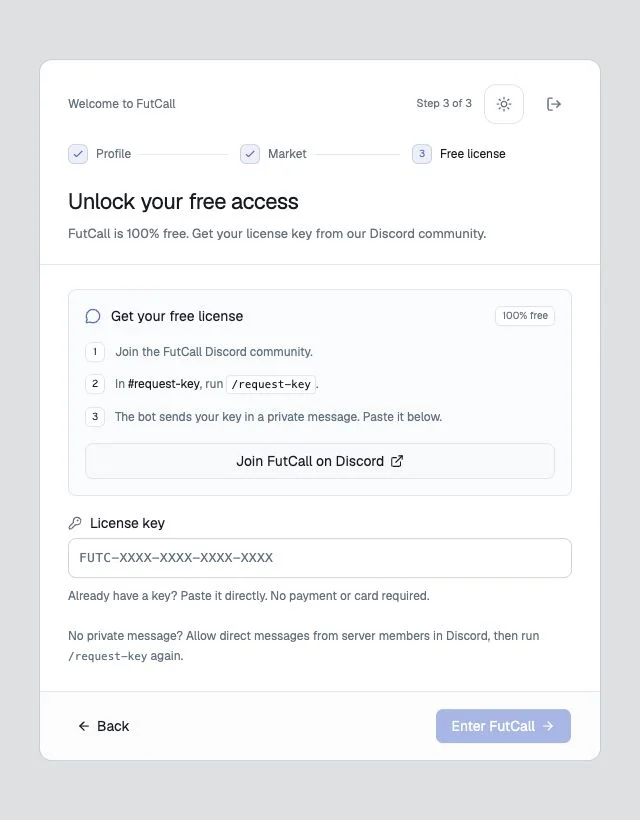
- Open the FutCall licence channel from setup or Plugins → Discord.
- In #request-key, enter
/request-keyand select the FutCall bot command. - Submit the command and open the bot’s direct message.
- Copy the entire
FUTC-XXXX-XXXX-XXXX-XXXXkey and return to FutCall.
The channel confirms the request privately; it does not display the key publicly. The format shown in this guide is a placeholder, not a usable key.
Activate during setup
Paste the key into License key at Free license, then select Enter FutCall. Access follows successful profile, market and licence validation.
Link Discord on an existing account
- Open the account icon at the bottom of the sidebar.
- Choose Plugins → Discord.
- Use Open the license channel if you still need a key.
- Paste your personal key into License key.
- Select Activate my license.
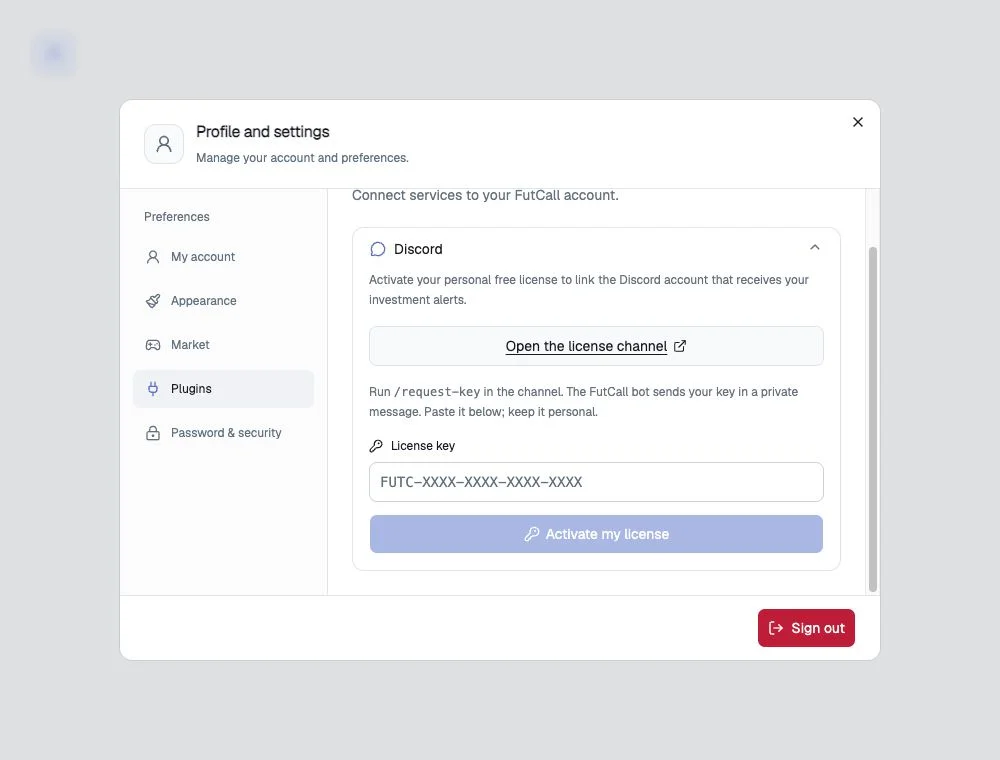
Discord license activated and Linked confirm the connection. The displayed ending of the Discord ID helps identify the linked account. Activation alone creates no alert: configure a condition on an investment afterwards.
No direct message
Allow direct messages from server members in Discord and check message requests and the account you are using. Run /request-key again after the indicated delay. Before activation, a new request can renew the key after 60 seconds and replace the previous one; use the latest key.
Key rejected
Check that the entire key came from the FutCall bot, is the latest one and has not already activated another account. Activation is limited to five attempts per fifteen minutes. To recover an existing portfolio, sign into its original account rather than attempting to reuse its key on a new account.
Sign-in and community roles
Continue with Discord handles authentication; /request-key obtains the licence. The linked member can receive Licence validée and Console or PC, matching the selected market. A temporary role-sync problem does not mean that the market preference failed to save. Keep passwords, keys and email codes private, including when requesting help.