
Discord alerts
Set return, price or profit thresholds and receive private Discord messages.
Link Discord first
Activate your personal key during setup or in Profile and settings → Plugins → Discord. Messages go to the Discord account that requested the key. Continue with Discord alone does not replace activation. Allow direct messages from the bot; see Licence and Discord.
Add a notification during purchase
Expand Notifications in Invest, enable Receive a private Discord alert, set a condition and threshold, then save the purchase. Buying alone creates no alert without opting in.
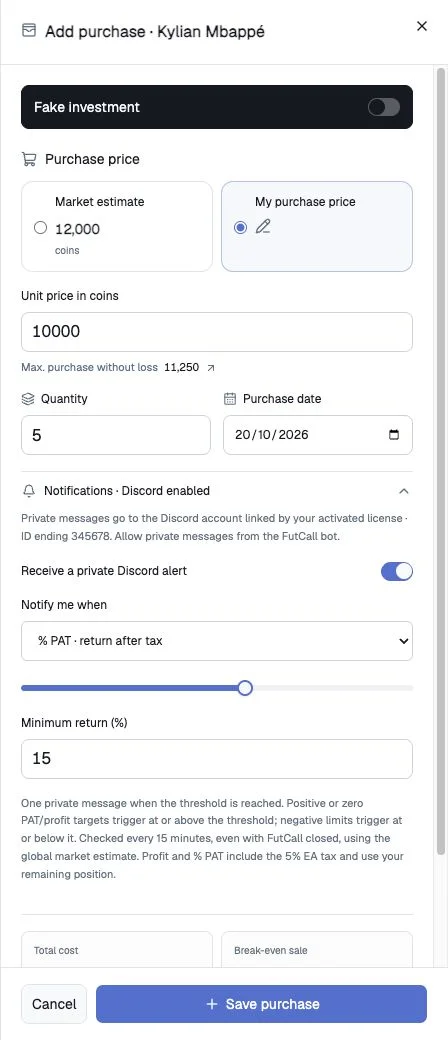
Add from Portfolio
Use Alerts when available, choose Notify me when, enter the threshold, check Alert condition and select Save alert. The form shows the linked recipient and check frequency.
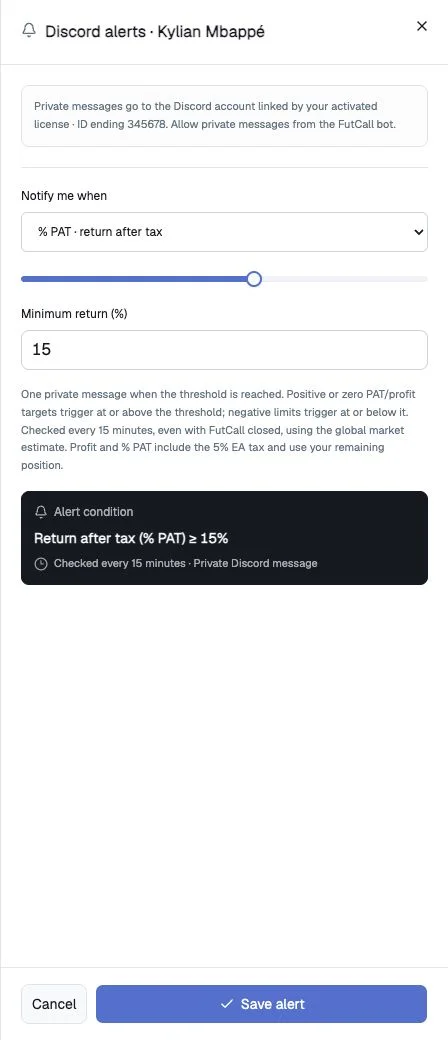
Choose a condition
| Condition | Compared value | Example |
|---|---|---|
| % PAT · return after tax | After-tax return relative to remaining purchase cost | 15: at least 15% |
| Target sale price | Estimated price per card | 12000: at least 12,000 coins |
| Net profit · whole position | After-tax profit across the remaining position | 5000: at least 5,000 coins |
PAT refers to the after-tax return in this context. One rule of each type is retained per position; when editing is accessible, saving the same type adjusts its threshold.
Gains and loss limits
Positive or zero return/profit targets trigger at or above the threshold. Negative limits trigger at or below it. For example: return 15 means ≥15%; return -5 means ≤−5%; profit 5000 means ≥5,000; profit -2000 means ≤−2,000 coins. Price targets remain positive and trigger upwards. Check the comparison shown before saving.
Frequency and countdown
Checks are scheduled every fifteen minutes, even with the app closed. The bell’s circle and mm:ss show the next scheduled check. Creating a rule does not restart the shared cycle. The countdown is not proof of a successful check or delivery, and brief crossings between checks can be missed.
In the current version, Alerts is disabled while a position has an active condition, with its countdown still visible. Edit, Pause, Resume and delete controls appear in the management sheet when accessible. Do not add a purchase just to work around a disabled alert button.
Alert states
| State | Meaning |
|---|---|
| Active / armed | Waiting for upcoming checks |
| Queued | Threshold observed; delivery pending |
| Sent | Message delivered; no automatic repeat |
| Paused | Rule or monitoring suspended; read its explanation |
| Blocked | Delivery prevented, including blocked DMs; allow DMs and reactivate when management is available |
| Closed | Rule closed, for example an ineligible position |
A triggered condition sends once. For another notification, reactivate or adjust it through the available management controls.
Calculation and delivery limits
Checks use the selected market’s global estimate and remaining holdings, deducting 5% tax for profit and return. Additional purchases and partial sales change the calculation base. Real and simulated positions remain separate; simulations are labelled in messages.
Unavailable prices or source prices over fifteen minutes old do not trigger alerts. Monitoring may pause temporarily when operational limits are reached; a pause is not evidence that the threshold was never crossed.
For missing messages, check the link, recipient, DM permissions, state, after-tax threshold, quantities and price freshness. Phone and sound notifications also depend on Discord settings. See Troubleshooting. Alerts inform you; they never buy or sell cards and cannot guarantee the observed price remains available.